
Skip to content

For parents

Parent accounts

yán chuán shēn jiào — “Teach by word, and by example”

What a parent account is for, how it differs from a learner account, and how to switch.

4 min read

Not what you were looking for?

A parent account is a learner account with a family workspace attached. You keep your own Chinese — this is not an observer role — and you gain child profiles, a view of each child’s progress, and the ability to give a child their own login when they are ready for one.

What it gives you

  • Child profilesA record per child with their name, age, level and goal. A profile is not a login — it is how you keep track before, or without, giving them one.
  • A family viewEvery child in one place, with what each has been doing.
  • Per-child progressThe same figures your child sees about themselves.
  • An explore launcherThings worth suggesting, at each child’s level.
  • Your own learningUnchanged. A parent account is a full learner account.

The red banner swaps its tabs for Family, Stats, Explore and Guide once you are on a parent account.

Profiles and logins are different

This is the distinction the whole feature turns on.

A child profile is a record on your account. It holds a name, an age, a level and a goal, and it exists so you can plan around a child who does not have an account. It is not a person who can sign in.

A child login is a real account, created deliberately, with its own email and password. The child signs in themselves, studies themselves, and their progress is theirs. Creating one requires you to affirm guardian consent, and that affirmation is recorded.

How many children

Up to 20 profiles on an account, which is a technical ceiling rather than an expectation — it exists so a homeschool co-op or a childminder is not blocked.

The Family plan at $39 a month covers Pro Plus access for up to two children, plus the parent dashboard and weekly reports, on one bill. Profiles beyond that are still tracked; what the plan covers is paid content access for the children who have logins.
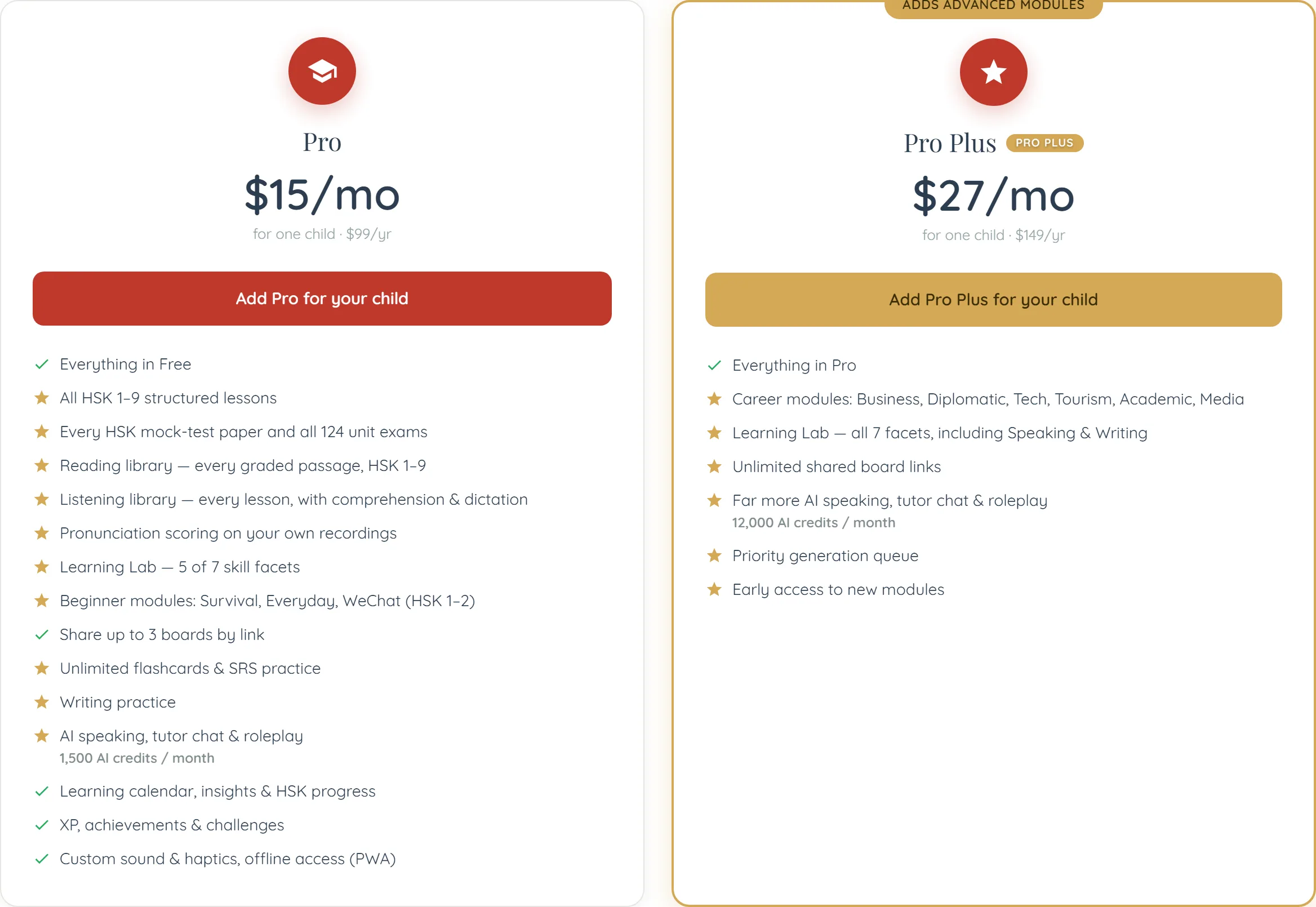
The two single-child plan cards on the family pricing page, side by side. On the left, Pro under a red circular graduation-cap badge: $15/mo, subtitled “for one child · $99/yr”, with a full-width red “Add Pro for your child” button above fifteen lines marked with green ticks and gold stars — everything in Free, all HSK 1–9 structured lessons, every HSK mock-test paper and all 124 unit exams, a reading library of every graded passage HSK 1–9, a listening library with comprehension and dictation, pronunciation scoring on your own recordings, “Learning Lab — 5 of 7 skill facets”, beginner modules (Survival, Everyday, WeChat, HSK 1–2), sharing up to 3 boards by link, unlimited flashcards and SRS practice, writing practice, “AI speaking, tutor chat & roleplay” with “1,500 AI credits / month” in small grey type beneath it, the learning calendar with insights and HSK progress, XP, achievements and challenges, and custom sound, haptics and offline access (PWA). On the right, Pro Plus, gold-bordered beneath a gold ribbon clipped by the top edge of the frame that reads “ADDS ADVANCED MODULES”, with a red circular star badge and a small gold PRO PLUS pill beside its name: $27/mo, “for one child · $149/yr”, a gold “Add Pro Plus for your child” button, and only seven lines — everything in Pro, “Career modules: Business, Diplomatic, Tech, Tourism, Academic, Media”, “Learning Lab — all 7 facets, including Speaking & Writing”, unlimited shared board links, far more AI speaking, tutor chat and roleplay at 12,000 AI credits a month, a priority generation queue, and early access to new modules. The lower half of the Pro Plus card is empty white space.
Read the Pro Plus card as a difference rather than a shorter offer: its first line is “Everything in Pro”, and the six lines under that are the whole of what the step from $15 to $27 buys — Career modules, the last two Learning Lab facets, unlimited board links in place of three, and eight times the AI credits. Both subtitles say “for one child”, so a second child means a second card at the same price, which is the arithmetic the Family plan exists to replace.

Getting a parent account

  1. Choose the parent roleDuring onboarding, or by changing your account type afterwards.
  2. Add your children as profilesName, and optionally age, level and goal. Two minutes each.
  3. Decide about logins laterNothing forces the decision now, and a profile is useful on its own.

Common questions

Yes. A parent account is a full learner account with the family workspace on top. Your lessons, progress and flashcards are unaffected.

Continue learning

Adding your childrenCreating a profile per child, setting their level and goals, and why they start without a login.The family viewYour children side by side — what each has done, and where to help.