Written and maintained by the Mandarin Temple Editorial Team.
Spaced repetition is the difference between having met a word and knowing it. The deck here schedules each card for the moment you are about to forget it, which is both the least work and the most durable result. This article is how to use it without fighting it.
Without a plan: 20 reviews a day
Pro adds: No daily ceiling
How it works
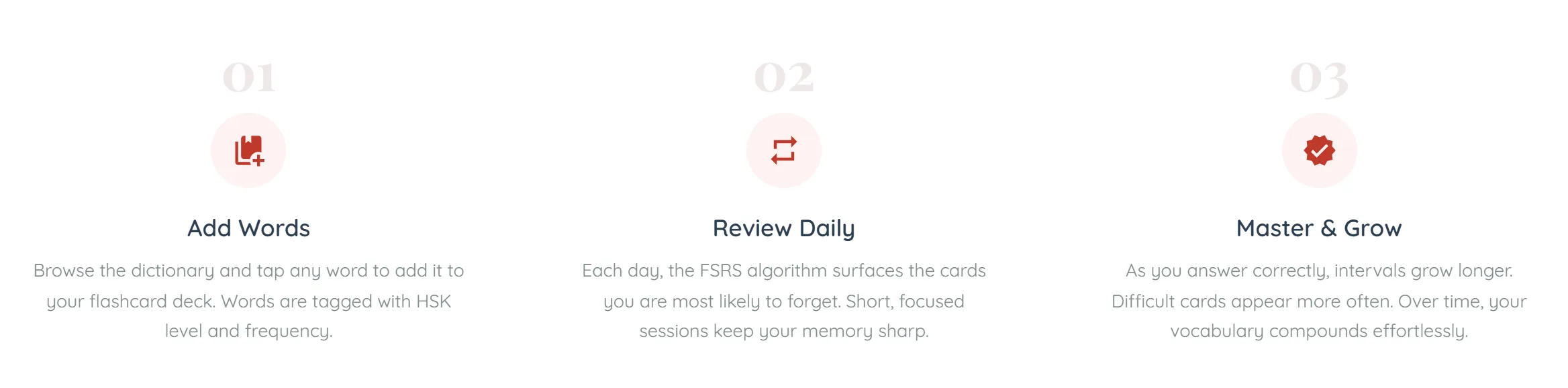
Add a word — From a dictionary entry, from a lesson’s vocabulary section, or from the popup that opens when you tap any character on the site — or bring a whole deck from Pleco, Anki or a list (import your deck).
See it when it is due — The deck shows you what is scheduled for today. Not everything you know — only what is close to slipping.
Grade your memory honestly — Again, Hard, Good or Easy. Your rating sets when the card returns, so an inflated grade only hides the word until you have genuinely lost it.
Let the interval grow — A word you keep getting right comes back in days, then weeks, then months. One you keep missing comes back tomorrow.
The page states the loop in three stages rather than four. Grading gets no column of its own, but it is the input behind everything the third one describes — intervals only move when you grade a card; nothing lengthens on its own.
The landing page’s demo card: the character alone, with Speak and Write greyed out and only Reveal live. In the real deck all three work — two are attempts, the third is a surrender. Again, Hard, Good and Easy are not drawn until you reveal, so you never grade a card whose answer is still hidden.
Why the intervals look odd
The scheduling uses FSRS, which models how memory for a specific card decays for a specific person, rather than applying a fixed multiplier to everyone.
The practical effect is that two words you learned on the same day can end up weeks apart, and that is correct — one of them is a word you find easy and the other is not. Do not try to even them out.
Fitting it into a day
Review before new material, not after — Review is the part that decays if postponed. New words will still be there in twenty minutes; a lapsed card will have cost you the interval.
Finish the queue — A short complete session beats a long partial one — cards left undone roll into tomorrow and the pile grows.
Do not add fifty words at once — Every card you add today is a review you owe tomorrow, and the day after. Adding a lesson’s worth is sustainable; adding a wordlist in one go is not — which is why an import lets you choose how many new words arrive each day.
Come back after a gap without clearing the backlog — If you have been away, do a normal-sized session rather than the whole pile. The schedule recovers on its own.
What it costs
Flashcards cost no credits on any plan — scheduling is arithmetic, not AI, so reviewing never touches your balance.
A free account reviews 20 cards a day, which resets at your own midnight rather than at some server's. Pro and Pro Plus remove the ceiling. The daily count is of distinct cards, so a word you rate *Again* and drill a second time in the same session only costs you one.
The number of cards due is always the true one, whatever your plan — if forty are waiting and you can start twenty, the page says both rather than quietly showing you the smaller figure.
Common questions
No. No AI is involved in scheduling or grading a card — the whole deck is free to use as often as you like once your plan includes it.
No, and you should not try. Do a normal session; the algorithm re-spaces what is overdue. Grinding through hundreds of lapsed cards in one sitting teaches you almost nothing and puts most people off entirely.
Because you rated it Hard, or because it is young — a new card comes back within a day or two however well you answered. Intervals lengthen with repeated success, not with a single one.
Yes. A word you genuinely know, or one you added by accident, can be taken out rather than rated Easy forever: during a review, after you reveal the card, choose **Remove this word from my deck** and confirm.
Yes. Your deck is saved to your account, so it follows you to any phone or computer you sign in on, with every card’s schedule intact.
Yes — export it as a text file and import it on the flashcards page. Each word becomes a card built from its dictionary entry here. See [import your deck from Anki or Pleco](/guide/learners/import-and-export-flashcards).
Yes, review is credited like any other study. It is also one of the few things that reliably keeps a streak alive on a day you have no time for a lesson.
Same idea, different scheduler and no setup. FSRS is a newer algorithm than the classic SM-2 most decks use, and the cards here arrive already made — with audio, banding and example sentences — rather than needing to be built. If you already have an Anki deck, you can import its words, and export your deck back to Anki at any time.
Continue learning
Import your deck from Anki or PlecoBring the words you already study — from Pleco, Anki or a list — into your flashcards, and take them out again.Your study planHow the calendar builds a week around your goals and available time, and how to change it.The Learning LabSeven facets of knowing a word, and why one number cannot describe your Chinese.Using the dictionarySearch 21,000+ entries by character, pinyin or meaning, and read everything a single entry holds.